


Google Ads favourite tool currently seems to be AI Max – another campaign setting to switch on alongside exact, phrase and broad match.
What is AI Max?
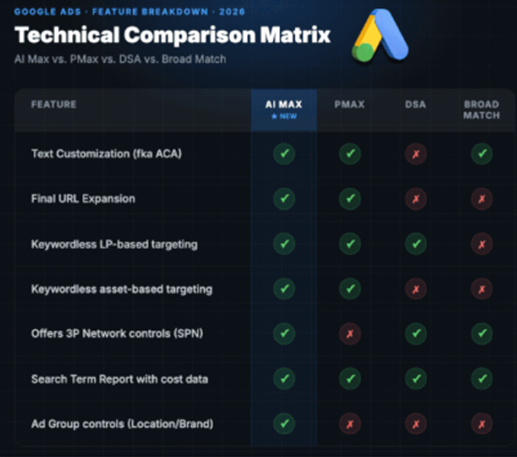
AI Max is the new, improved version of Dynamic Search Ads, leveraging Google’s AI to match user’s search terms with relevant ads to make sure your ads appear to the right people at the right time. It’s similar to broad match, but, according to Google, better!
It captures a wider variety of searches that match the search intent you are after, allowing you to appear against longer tail queries that otherwise may have been missed. In your search terms report, you will see ‘AI Max’ added as match type, as well as a "Source" column to show you why an AI Max match happened. It will tell you if it came from a broad match expansion or a "keywordless" landing page match. This is where AI Max looks at your existing keywords, ad group assets, and the content of your landing pages to understand the business context. It then uses keywordless technology to match your ads to ‘high-performing, intent-driven user queries you don’t explicitly bid on.’
How does AI Max work?
If applied across your whole account, AI Max effectively switches on broad match for your entire campaign and treats all your keywords as broad match terms. This means that high-performing exact or phrase match keywords will be expanded by AI Max using "keywordless" technology (in a similar way to how Dynamic Search Ads crawled your site). Therefore, to prevent cannibalisation of your best performing keywords, it is best practice to set up a dedicated AI Max campaign targeting a few keywords that would potentially work well in broad match.
Not only does AI Max expand on keywords, ‘Final URL Expansion’ will also be enabled by default. This will mean Google will scan your entire website domain and route users to the landing page it sees as most relevant to their query. This means that the campaign completely ignores the landing page you originally set up with the ad. You can turn this off in your campaign settings, or you can use exclusions or strict inclusions if you do want to test this feature.
What are brand exclusions and how should they be used?
With AI Max, you also get access to brand key term exclusions. It’s important to be aggressive with these exclusions as AI Max relies heavily on intent-based AI matching, typically encroaching on brand searches. This includes your own brand and competitors brands, so if you want to avoid AI Max ads appearing for these terms because you have dedicated campaigns set up, it’s vital that you exclude your own brand and relevant competitors brand terms. This technique goes hand-in-hand with applying negative keywords, running regular SQRs and excluding any irrelevant search terms to help exclude irrelevant search intent.
Test AI Max, or fall behind
Overall, AI Max is worth a test, especially if your brand offering typically generates long tail search queries. Just make sure you are keeping a close eye on the traffic to support the AI learning to prevent irrelevant and weaker leads from slipping through the cracks. Google is evolving and offering more AI driven campaigns, meaning if you aren’t utilising PMax or AI Max, you may be falling behind.
If you'd like help with perfecting your use of AI Max, please get in touch.


Newsletter sign up
Post Information
| Author | Chloe Hall |
| Channel | Media |